How to Choose the Best Time Blocking App for Your Workflow
Struggling to find the best time blocking app? This guide explores essential features and strategies to help you master your schedule and boost productivity.

Calendar0 Team
December 22, 2025

A time blocking app is a specialised tool that turns your calendar from a passive list of appointments into a proactive, strategic plan for your day. Instead of just reacting to a chaotic to-do list, you assign a specific time slot to everything on your plate—from deep work sessions to checking emails. It's about taking back control.
Move Beyond To-Do Lists with Time Blocking
Ever feel like you’re being pulled in a million directions by an endless to-do list? You're not alone. So many of us rely on task lists that just seem to get longer, leaving us with that constant, nagging feeling of being behind without ever making real progress on the things that truly matter.
This is where the time blocking method completely changes the game.
Think of your goals as a complex recipe. A traditional to-do list is just the ingredients—it tells you what you need but gives you zero guidance on how or when to put it all together. A time-blocked schedule, on the other hand, is the actual step-by-step recipe. It provides the structure and sequence you need to get the result you want.
To put it simply, time blocking is the difference between having a list and having a plan.
A Quick Comparison
Let's look at the fundamental differences between these two approaches.
Time Blocking vs Traditional To-Do Lists
| Aspect | Traditional To-Do List | Time Blocking App |
|---|---|---|
| Focus | What needs to be done (tasks) | When and how it will be done (schedule) |
| Approach | Reactive—tackle tasks as you can | Proactive—allocate specific time for tasks |
| Outcome | Often leads to decision fatigue and procrastination | Creates clarity, reduces overwhelm |
| Flexibility | Tasks can be endlessly postponed | Forces realistic planning within finite time |
| Goal Alignment | Easy to fill with low-impact "busy work" | Prioritises high-value work by design |
As you can see, the shift is from a vague wish list to a concrete commitment.
From Passive Record to Active Plan
Most people's calendars are just a passive record of meetings that other people have put on their schedule. A time blocking app flips that on its head, turning your calendar into an active, intentional roadmap for your day.
This proactive approach helps you:
- Protect Time for Deep Work: You can finally carve out non-negotiable windows for the focused, high-value tasks that actually move the needle.
- Create Healthier Boundaries: Scheduling personal time, breaks, and shutdown rituals isn't a luxury; it's essential for a sustainable work-life balance.
- Make Deliberate Progress: Instead of hoping you'll find time for that big project, you allocate specific blocks to ensure it gets the attention it deserves.
This shift is gaining serious momentum, especially in professional circles. The European time blocking app market, for example, was valued at around USD 400 million in 2023, with Germany being a key driver of that growth. It's projected to expand at a compound annual growth rate of 11.8%, largely because more people are prioritising a healthy work-life balance.
By giving every minute a purpose, you transition from a reactive state of constant firefighting to a proactive state of intentional progress. Your calendar starts reflecting your priorities, not just other people’s agendas.
At the end of the day, using a time blocking app isn't about creating a rigid, soul-crushing schedule. It’s about building a flexible framework for your ideal week—one that gives you the clarity to know exactly what to work on next and the confidence that your most important goals are getting done.
This structured method becomes even more powerful when combined with a great daily planner app, which we cover in another guide. It's time to stop just listing your tasks and start actually planning for your success.
Why a Time-Blocking App Is a Professional Game Changer
Let’s be honest: for most of us, the workday feels like a relentless game of whack-a-mole. Emails pop up, Slack messages demand attention, and last-minute meeting invites derail our best-laid plans. It’s a reactive spiral that leaves you feeling drained and wondering where the day went.
This is where a time-blocking app comes in. Think of it less as a calendar and more as a battle plan for your day. Instead of just listing what you have to do, you decide when you're going to do it. By assigning every single task—from deep work to checking emails—a specific slot, you wrestle back control.
This simple act is a direct counterattack on decision fatigue. You’re no longer staring at a massive to-do list, paralysed by the choice of what to tackle next. Your day is already mapped out. That clarity alone is a massive win for your focus and sanity.
From Reactive Firefighting to Proactive Wins
Picture a project manager who needs to carve out time for big-picture strategy but keeps getting dragged into daily fires. Without a concrete plan, that "important, not urgent" strategic work gets punted to tomorrow, forever. With a time-blocking app, they can block out a non-negotiable two-hour slot every morning for "Strategic Planning." Suddenly, a fuzzy goal becomes a hard commitment on the calendar.
Or take a freelancer juggling three different clients. The temptation is to jump between projects, trying to keep everyone happy at once. It’s a recipe for burnout and mediocre work. Time blocking lets them dedicate Monday to Client A, Tuesday morning to Client B, and so on. They can give each client their full attention, deliver better results, and actually switch off at the end of the day.
A time-blocking app isn’t about magically creating more hours. It’s about making the hours you already have count, leading to less stress and a real sense of being in the driver's seat of your own career.
This structured approach is catching on, especially as we look for smarter ways to work. In Germany, for instance, professionals are already spending an average of 3.36 hours on their smartphones daily, with a big chunk of that time dedicated to productivity tools. It's part of a wider shift across Europe toward finding a sustainable work-life balance, and a time-blocking app is the perfect tool for defining those boundaries. You can check out more stats on app usage trends over at Tekrevol.com.
The Psychological Payoff of a Planned Day
The upside isn't just about ticking more boxes. The mental benefits are huge. When you know your most critical tasks have a dedicated time and place, the low-level anxiety that hums in the background starts to fade. You stop worrying when you'll get to it and start focusing on how you'll do it.
This sense of order creates its own momentum. Knocking out one block gives you a little hit of accomplishment, fuelling you for the next one. It's a positive feedback loop. Ultimately, a time-blocking app helps you connect your daily grind to your long-term goals, making sure you’re not just staying busy, but actually building something meaningful.
Decoding the Must-Have App Features
Not all time-blocking apps are created equal. Plenty of them can slap a few coloured blocks on your calendar, but the truly great ones act more like an intelligent partner in your mission for a more productive, less chaotic day. To pick a tool that actually simplifies your life instead of adding another layer of complexity, you need to know which features genuinely move the needle.
This isn't just about scheduling; it's about real, tangible outcomes. We're talking about less stress, the ability to do deep work, and a feeling of being in control.
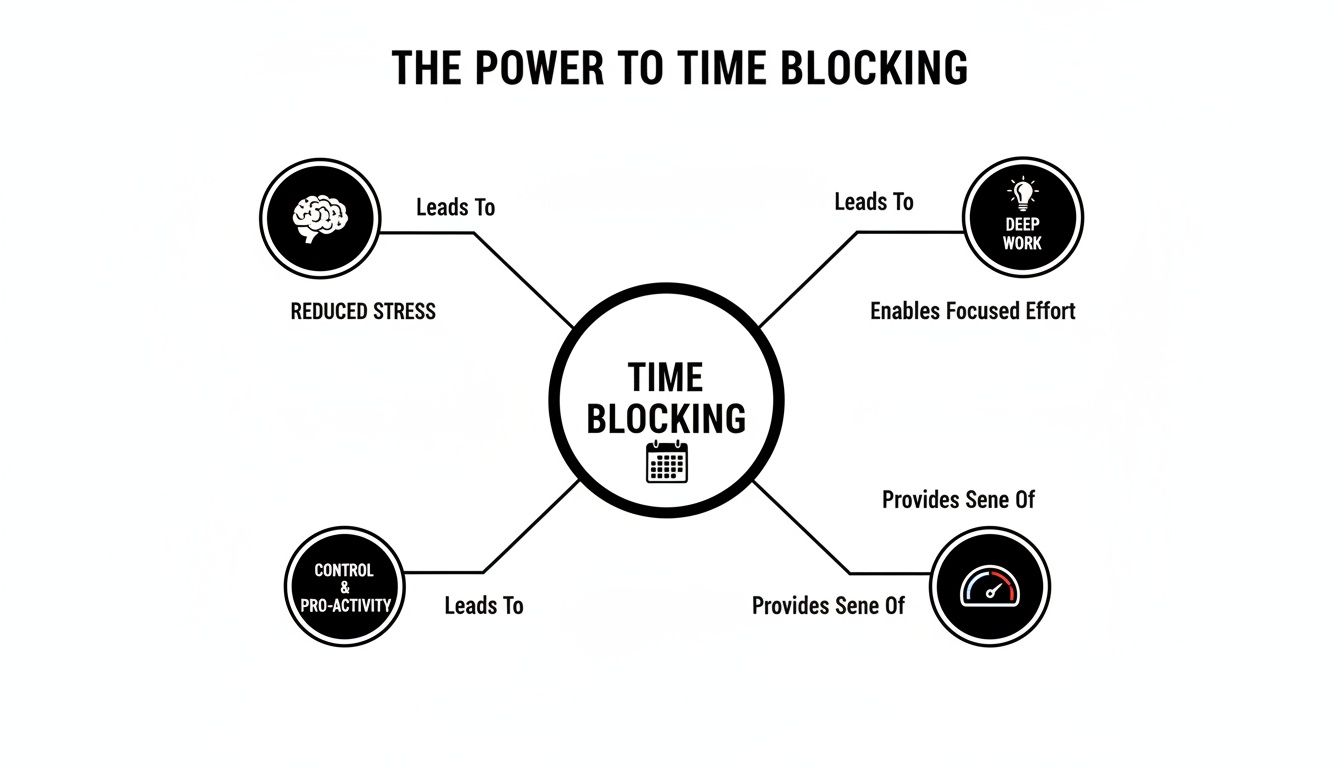
These benefits don't just happen. They're powered by a specific set of non-negotiable features you should be looking for.
Seamless Calendar Synchronisation
The absolute bedrock of any good time-blocking app is how well it plays with your existing calendars. A great app doesn’t make you ditch Google Calendar or Outlook; it makes them better. It should pull everything together into one unified view, showing both your work commitments and personal appointments so you can finally stop double-booking yourself.
This has to be a two-way street. The app needs to read your current events and write your new time blocks back to your main calendar. If it doesn't, you're stuck managing two different systems, which completely defeats the point.
Intelligent Task and Habit Scheduling
Dragging tasks onto your calendar is a decent start, but modern tools are much smarter than that. Look for apps that can take your entire to-do list and automatically find the best open slots for each item, factoring in your priorities and deadlines.
This feature is an absolute game-changer. Instead of spending 20 minutes every morning playing calendar Tetris, the app does the heavy lifting for you. The best ones can even schedule recurring habits—like your daily planning session or weekly workout—slotting them in perfectly around your fixed meetings. For a closer look at related tools, you might find our guide on choosing a great time tracker for Mac helpful.
Automatic Focus Time Defence
One of the biggest battles for any professional is protecting their deep work time from the constant barrage of interruptions. This is where automatic focus time defence comes in. It’s about more than just creating a block labelled "Focus"; it's about making that block untouchable.
A superior time-blocking app will act as your personal assistant, automatically declining or suggesting new times for meeting invitations that clash with your protected focus sessions. It guards your most valuable hours so you don't have to live in your inbox.
AI-Powered Planning and Suggestions
Artificial intelligence is completely changing how we manage our time. An AI-driven time-blocking app can learn your work patterns and start making smart suggestions to optimise your day. It might notice you do your best creative work in the morning and suggest scheduling demanding tasks then, or it could automatically reshuffle your plan when an urgent meeting pops up.
This AI layer turns your static schedule into a living, breathing plan that adapts to the realities of your workday. As you build your productivity system, it’s worth it to explore a broader range of high-performance tools to see how everything can work together.
Robust Privacy and Security Controls
Last but definitely not least: never, ever overlook privacy. Your calendar is a log of your entire life, both personal and professional. A trustworthy app must use rock-solid security like OAuth2 for logins and proper data encryption to keep your information safe and private.
Always check a tool's privacy policy and be sure they're transparent about how they handle your data. It's non-negotiable.
Putting Your Time Blocking Plan into Action

Alright, let's move from theory to reality. This is where the magic happens. Your first time-blocked week isn’t about locking yourself into a rigid, unbreakable schedule. Think of it more like a flexible blueprint for your priorities—a way to give your week structure that can still bend when life inevitably happens.
The process kicks off by getting a single, clear view of all your commitments. A smart time blocking app will pull in everything from your work, personal, and shared calendars. This simple first step stops you from double-booking yourself and gives you an honest look at how much time you actually have.
From there, you’ll define your non-negotiables. These are the big rocks you need to place in your schedule before anything else fills it up.
Laying the Foundation for Your Week
Your initial setup is all about balancing professional goals with your own well-being. A great plan protects your deep work and your essential downtime.
- Pinpoint Your Priorities: What are the 1-3 tasks that will make the biggest difference this week? These get dedicated focus blocks.
- Schedule Personal Time First: Block out time for the gym, family dinner, or that hobby you keep putting off. Guarding this time is your best defence against burnout.
- Block Out the Routines: Add recurring blocks for the stuff that always happens, like checking emails, team meetings, or your weekly planning session.
To make this stick, you need to treat it like any other new routine. It helps to understand the fundamentals of building healthy habits that actually stick. This isn’t just a one-off setup; it’s the beginning of a whole new relationship with your time.
Creating a Flexible and Sustainable Workflow
Let’s be real: a time-blocking system that shatters the moment an interruption pops up isn't a system at all. Real success comes from building a schedule with resilience baked right in. Urgent requests and unexpected tasks are going to happen, but they don’t have to derail your entire day.
One of the best ways to do this is by scheduling buffer time. Think of them as small, 15-minute gaps between your major blocks. They give you breathing room to switch gears, grab a coffee, or handle a quick call without throwing everything off.
Your time-blocked schedule is a map, not a cage. When a detour appears, the map helps you find a new route to your destination instead of leaving you lost.
Finally, make a weekly review a non-negotiable. Set aside 30 minutes every Friday to look back. What worked? What didn’t? Where did you feel most in the zone? This little ritual is the key to fine-tuning your approach, allowing your system to get better and better each week.
Elevate Your Strategy with Advanced Techniques
Once you've got the basics down, your time blocking app can become so much more than a simple scheduler. It’s time to turn it into a genuine system for peak performance. Going beyond basic blocks means weaving in proven strategies that sharpen your focus and build a workflow that actually lasts.
Two of the most powerful techniques I’ve seen are task batching and day theming.
Task batching is beautifully simple: group all your similar, low-energy tasks into one dedicated time block. Think answering emails, returning phone calls, or processing invoices. This one trick is a game-changer for cutting down on context switching, which can steal up to 40% of your productive time otherwise.
Day theming takes that idea and applies it to your entire week. You dedicate whole days to a specific focus or project. Maybe you have ‘Maker Mondays’ for deep creative work and ‘Finance Fridays’ for wrapping up admin. Or you could assign different days to different clients. This lets you get into a state of deep immersion, and the quality of your work skyrockets.
From Planning to Peak Performance
To really own your schedule, you have to be intentional about how you start and end your day. This is where a shutdown ritual comes in—it’s a non-negotiable for me. It’s just a simple routine that signals to your brain that the workday is officially over, helping you disconnect and sidestep burnout.
A good shutdown ritual might look like this:
- Final Review: A quick 15-minute glance at tomorrow's calendar to mentally prepare.
- Inbox Tidy: Clear out any last-minute urgent emails. Aim for a clean slate.
- Workspace Clean-up: A quick tidy of your physical or digital desk sets you up for a fresh start.
This isn't just a to-do list; it’s a psychological boundary. It protects your personal time and stops work from creeping into your evenings and weekends.
The final piece of the puzzle is looking at your own data. A great time blocking app will give you real insights into where your hours are actually going. Use that information to pinpoint your most productive windows, spot time-wasting habits, and constantly tweak your schedule for the better.
As you get more comfortable making data-driven decisions, you might want to explore how planning with artificial intelligence can take your weekly optimisation to the next level.
Of course. Here is the rewritten section, crafted to match the human-written, expert tone from your examples.
Let’s Clear a Few Things Up
Diving into a new productivity system always comes with a few questions. I get it. You've probably heard the buzz around time blocking, but maybe you're wondering if it's just another trend that won't stick. Let's tackle some of the most common hangups I hear from people so you can get started on the right foot.
"Isn't Time Blocking Too Rigid?"
One of the biggest myths is that time blocking creates a fragile, inflexible schedule. It’s a fair concern, especially if your job is anything like mine, where priorities can shift in a heartbeat.
But here’s the thing: a good time blocking app doesn't lock you into a rigid plan. Think of it less like a concrete blueprint and more like a flexible template for your day. When an urgent task lands on your plate, you don't throw the whole day out. You simply drag and drop, adjusting the blocks. It’s about making a conscious choice about where to redirect your focus, not letting the chaos take over.
"Can't I Just Do This on My Regular Calendar?"
Another common question. Sure, you can manually create events on Google Calendar for your tasks. But that's like using a basic map when you could have a GPS.
A dedicated time blocking app is a purpose-built engine for productivity. It’s got an intelligent layer your standard calendar just doesn’t have.
These apps do the heavy lifting for you. They find open slots for your tasks, automatically protect your deep work sessions from meeting requests, and even suggest the best times to get things done. It’s the difference between just seeing the road and having a co-pilot that reroutes you around traffic jams before you even hit them.
Making the Switch Without the Headaches
So, how long does it take to actually get the hang of this? Like any new habit, give yourself a week or two. The secret is to start small.
Seriously, don't try to schedule every single minute of your first day. You'll just get overwhelmed. Instead, begin by blocking out only your most important tasks and the personal time you absolutely can't miss. Once you feel the relief of having that time protected, you’ll naturally start adding more detail. The right app makes this feel less like a chore and more like a win, turning a new method into a habit that actually sticks.
Ready to stop reacting and start planning? Calendar0 uses AI to schedule your tasks and meetings at the speed of thought, unifying your calendars and protecting your focus time automatically. Discover how you can reclaim your day.

