Choosing a Secure Task Manager
Learn how to choose a secure task manager to protect your data. This guide covers key security features, evaluation criteria, and best practices.

Calendar0 Team
November 7, 2025

A secure task manager isn't just a fancy to-do list. It's a fortified digital workspace, built from the ground up to protect your most sensitive project data, client details, and strategic plans from anyone who shouldn't see them.
Think of it like this: a regular task app is a sticky note you leave on a public desk. A secure task manager is a digital safe.
Why Does Security Even Matter for Task Management?
In a world where project details are often packed with sensitive information—from financial data and intellectual property to new product launch plans—the security of your task management tool is everything. A standard app might help you organise your day, but a secure one is built to safeguard your entire operation.
That distinction is critical. The data inside these platforms often represents a company's strategic core.
Imagine your task manager holds the roadmap for a new product, confidential client feedback, or internal financial deadlines. A breach there could be devastating. We're talking about competitive disadvantage, massive regulatory fines, and a complete loss of client trust. This is why foundational security isn't just a nice-to-have; it's non-negotiable.
The Core Pillars of a Secure Workspace
So, what separates a basic tool from a truly secure one? It comes down to a few core pillars that create a protected environment. These aren't just buzzwords on a feature list; they're essential components of a system you can actually trust.
This table breaks down the absolute must-haves.
| Core Pillars of a Secure Task Manager | | :--- | :--- | :--- | | Security Pillar | What It Protects | Why It's Essential | | Data Encryption | Your raw data (tasks, files, comments) | Makes your information unreadable to outsiders, both when it's stored on servers (at rest) and when it's moving across the internet (in transit). | | Granular Access Controls | Who can see or do what within a project | Enforces the "principle of least privilege," ensuring team members only access the information they absolutely need to do their job. No more, no less. | | Compliance & Data Residency | Your legal and regulatory obligations | Guarantees the platform meets regional data protection laws (like GDPR) and often lets you choose where your data is stored, keeping it within a specific country or region. |
These aren't niche concerns anymore. The demand for secure tools is exploding across Europe. In 2024, the continent had over 77 million task management software users, with a huge concentration in Germany. Of those, more than 13 million specifically sought out platforms offering regional servers and end-to-end encryption. The message is clear: security sells.
Ultimately, a secure task manager buys you peace of mind. It allows your team to focus on getting work done, not worrying about whether their data is about to leak.
To get a better handle on the bigger picture of digital safety, it's worth reading up on how to protect personal information online. The same principles that apply to you personally are even more critical when you're managing a team's collective work.
The Security Features That Actually Matter
When you're looking for a secure task manager, seeing the word "secure" splashed across a homepage isn't enough. Real security isn't a marketing slogan; it's a stack of specific, non-negotiable features that create a digital fortress around your team's work. Knowing what to look for is the first step to making a smart choice.
Think of it like building a house. You wouldn't just settle for a front door. You need solid walls, proper locks, and maybe even an alarm system. Each part plays a critical role in protecting what's inside.
End-to-End Encryption: The Digital Sealed Envelope
First on the list has to be end-to-end encryption (E2EE). This is the absolute gold standard for privacy.
Imagine writing a sensitive note, sealing it in an envelope, and mailing it. Only the person you sent it to has the key to open it. Not the postal worker, not the people at the sorting facility, not even the head of the post office.
That’s E2EE in a nutshell. Your data gets scrambled on your device and only gets unscrambled on your team member's device. The company providing the service can't read it. This means even if their servers get hacked, your information is just unreadable gibberish to the attackers.
Without end-to-end encryption, you're trusting the provider to keep your data safe on their servers. With E2EE, you don't have to trust anyone but your own team. It's the ultimate defence against server-side breaches.
Multi-Factor Authentication: Your Digital Bouncer
Next up is multi-factor authentication (MFA). This is like having a bouncer at a club who checks both your ID and your name on the list. Just having one isn't enough to get you inside. A stolen password alone suddenly becomes useless.
MFA makes you prove who you are in more than one way before granting access. It usually combines a few things:
- Something you know: Like your password.
- Something you have: A code from an authenticator app or a physical key.
- Something you are: Your fingerprint or a face scan.
Flipping on MFA drastically cuts down the risk of someone breaking into an account, even if that user's password was leaked somewhere else online.
Granular Access Controls and Data Residency
A truly secure task manager also needs granular access controls. Think of this as giving out different keys for different rooms in your office. A junior team member gets a key to the main work area, but only a senior manager has the key to the executive office where the strategic plans are kept.
This puts the principle of least privilege into practice, making sure people only see the information they absolutely need to do their jobs. It’s a simple concept that prevents accidental data leaks and contains the damage if one person’s account gets compromised.
Just as important is data residency. This feature lets you choose the physical, geographic region where your data is stored—a critical detail for complying with laws like GDPR. For businesses in Germany, for example, keeping data inside the EU isn’t just a nice-to-have; it's a legal requirement. This laser focus on compliance and security is fuelling massive market growth. Germany’s managed services market, which helps support these platforms, hit a value of USD 24.4 billion in 2023 and is expected to nearly double by 2032, driven largely by cybersecurity and GDPR needs. You can discover more insights about Germany's managed services market trends.
Finally, always check for audit logs. These are the detailed, unchangeable records of who did what, and when. If a critical task is suddenly deleted or a project’s status is changed, the audit log shows you exactly which user account made the change. It creates accountability and makes it much easier to track down any suspicious activity.
How to Evaluate a Secure Task Manager
Choosing the right secure task manager means going beyond marketing fluff and getting your hands dirty. It’s not about ticking boxes on a feature list; it’s about asking the right questions to figure out how a platform really protects your data. A solid evaluation process helps you strike that perfect balance between rock-solid security and a tool your team will actually use.
The first step? Look for verifiable proof, not just promises. Start by asking any potential vendor for their compliance and certification details.
Do they have certifications like ISO 27001 or SOC 2? These aren't just fancy acronyms; they represent independent audits confirming that a company meets tough international standards for information security. If a vendor is happy to share these reports, it’s a great sign of transparency and commitment.
Asking the Hard Questions
Now it's time to dig into the specifics of their security setup. Don’t be shy about asking direct, even technical, questions about how they handle your team’s sensitive information. This is where you separate the truly secure platforms from the ones that just talk a good game.
Here are a few essential questions to throw at any vendor:
- Encryption Protocols: Do you offer end-to-end encryption? If not, what level of encryption do you use for data when it's stored (at rest) and when it's being sent (in transit)?
- Incident Response: What’s your documented plan for a data breach? How and when would you let us know if something happened?
- Data Policies: How do you handle data deletion? Can you guarantee our data is wiped for good when we close our account?
When you're doing your homework, also look for clear and open information about their security practices. You can often find this in resources like a service's Trust Center.
This decision tree infographic breaks down the core pillars—encryption, authentication, and access controls—that form the bedrock of any secure tool.
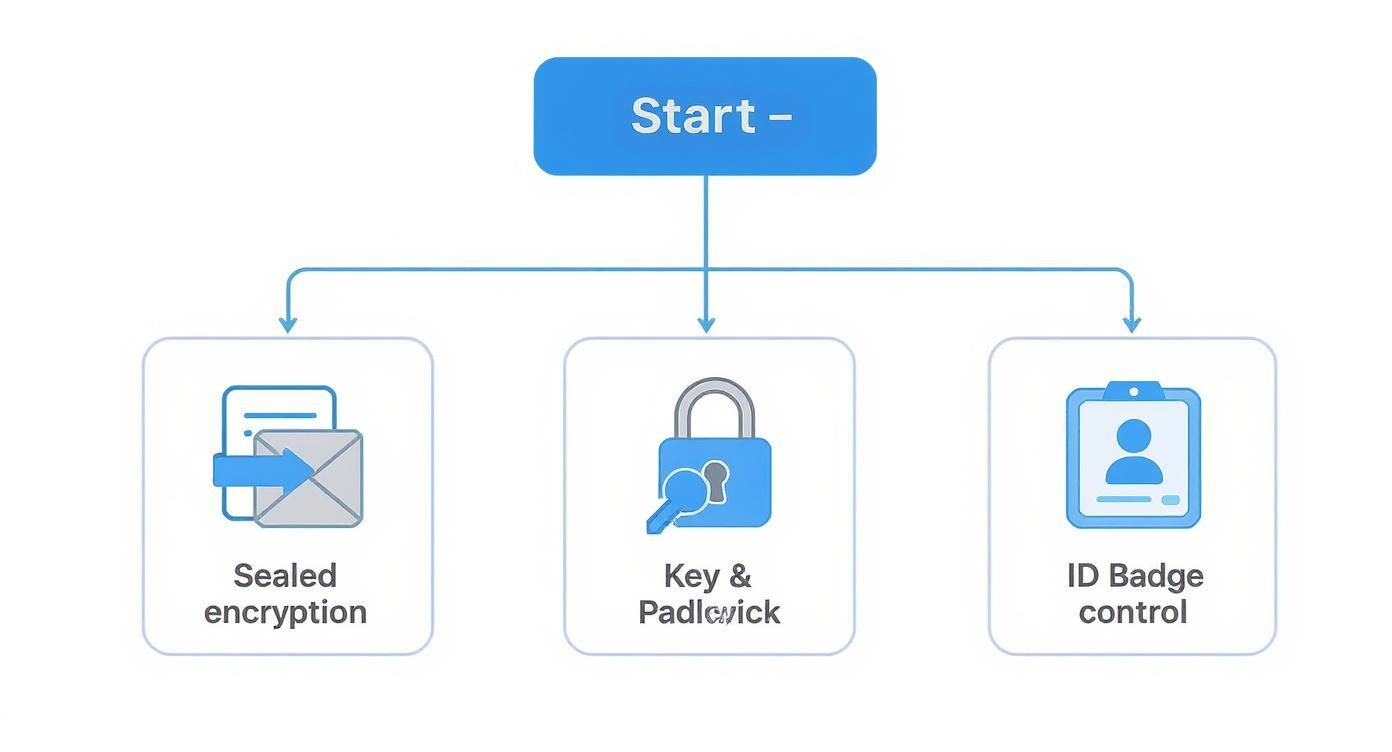
The visual makes a key point: a tool is only as strong as its weakest link. If even one of these pillars is wobbly, it can create major vulnerabilities.
Security Feature Comparison Checklist
To make this process easier, use a simple checklist to compare vendors side-by-side. This keeps you focused on what matters and helps you spot the differences quickly.
| Feature/Question | Vendor A | Vendor B | Vendor C |
|---|---|---|---|
| Offers End-to-End Encryption? | |||
| SOC 2 or ISO 27001 Certified? | |||
| Supports Single Sign-On (SSO)? | |||
| Provides Granular Access Controls? | |||
| Has a Public Trust Centre? | |||
| Data Residency Options (e.g., EU)? |
By filling this out for each candidate, you’ll get a much clearer picture of who takes security most seriously, beyond just the marketing claims.
Prioritising Data Privacy and User Experience
Finally, a secure tool has to respect user privacy and be easy for managers to actually manage. A clean, simple interface for setting and reviewing permissions is non-negotiable. If it’s a headache for a team lead to apply the principle of least privilege, mistakes are bound to happen.
A complicated security interface often leads to misconfigurations, which can be just as dangerous as a direct attack. The best tools make it simple to do the secure thing.
Take the time to review the company’s privacy documentation. A clear and accessible policy is a good sign they take data protection seriously. For an example of what this looks like, you can see how a comprehensive privacy policy should outline exactly how user data is collected, used, and protected. This kind of detail is what helps you make a truly informed decision that fits your organisation's standards.
Best Practices for Configuring Your Tool
Picking the right secure task manager is a great start, but it's only half the battle. How you set it up is what really turns a powerful tool into a fortress for your team's data. A thoughtful configuration prevents those common—and costly—security blunders that often sneak in through default settings.
The first and most critical step? Enforce multi-factor authentication (MFA) for every single user. No exceptions. Think of MFA as needing two different keys to unlock a door instead of just one. Even if an attacker manages to steal a user's password, they're stopped dead in their tracks without that second code from the user's phone or physical key.
Leaving MFA optional is one of the biggest mistakes you can make. Mandate it from day one.
Applying the Principle of Least Privilege
Next, you have to get granular with user roles and permissions. This is where the principle of least privilege comes into play. It's a simple but incredibly powerful idea: users should only have access to the exact information and functions they need to do their jobs. Nothing more.
For example, a freelance designer working on one project shouldn't be able to browse your company's entire client list or see the financial roadmap for next year. A truly secure task manager lets you create custom roles with surgical precision, preventing data from accidentally ending up in the wrong hands.
A well-configured system doesn't just block external threats; it minimises internal risk. By limiting access, you drastically reduce the potential damage from both human error and compromised accounts.
Establishing Robust Backup and Integration Hygiene
Even with the best defences in place, you still need a safety net. Backing up your task data regularly is non-negotiable. It's your get-out-of-jail-free card in case of an accidental mass deletion or, worse, a ransomware attack. A solid backup plan means you can restore your workspace and get back on track with minimal disruption. For those who like to automate, understanding how to schedule tasks, like scripting backups with macOS cron jobs, offers a deeper look into maintaining system integrity.
Finally, you need to practice strict integration hygiene. Before you connect any third-party app to your task manager, vet its security protocols thoroughly. Remember, every new integration is another potential doorway into your system.
- Review permissions: What data is the app actually asking to access? Be skeptical.
- Check certifications: Look for security credentials like SOC 2 on the vendor’s website. It shows they take this stuff seriously.
- Limit connections: Only integrate apps that are absolutely essential to your workflow.
By putting these practices into action, you’re no longer just using a secure tool—you're actively maintaining a secure operational environment.
Common Threat Scenarios and How to Stop Them
Security features on a spec sheet are one thing, but their real value snaps into focus when a crisis hits. Seeing how a secure task manager acts under pressure is what separates abstract concepts from tangible protection. Let’s walk through a few all-too-common stories.
Imagine a marketing manager, deep in a project launch, accidentally sets the entire confidential strategy board to "public." In a basic tool, that's it—your timelines, budgets, and competitive plans are out in the open. A truly secure task manager, however, would have granular access controls that make this kind of slip-up nearly impossible, likely requiring multi-level confirmation for such a drastic change.
Better yet, a savvy manager could have configured the board’s permissions so only a handful of senior team members could even touch the sharing settings, stopping the mistake before it ever had a chance to happen.
Responding to Insider Threats
Now, let's consider something more deliberate: a disgruntled employee who just handed in their notice. Before IT has a chance to revoke their access, they log in and start deleting critical project files to sabotage the team on their way out. This is where audit logs become your saving grace.
An administrator would see a real-time feed of the user’s destructive activity. The logs would show exactly what was deleted, who did it, and precisely when. This gives the team the power to:
- Instantly pinpoint the source of the problem.
- Use backups to restore the deleted information without missing a beat.
- Provide concrete evidence for any necessary follow-up action.
Without those logs, the team would be left scrambling in the dark, wondering what just happened and how on earth to fix it.
A robust secure task manager doesn't just block attacks; it gives you the tools for rapid, evidence-based recovery. It turns a potential catastrophe into a manageable incident.
Defending Against External Attacks
Finally, let’s look at a classic phishing attack. An employee gets a convincing email that looks like it’s from their task management provider, asking them to log in to verify their account. They click the link, land on a fake site, and punch in their credentials. Just like that, an attacker has their password.
With a standard setup, the attacker is now inside your system. But if your organisation enforces multi-factor authentication (MFA), that stolen password is completely useless. The attack is stopped cold because the thief doesn’t have the second piece of the puzzle—the code from the employee’s phone. This single layer of defence neutralises one of the most common and effective cyberattacks out there.
The importance of this is crystal clear in markets like Germany, where the workforce management software sector accounted for 25.5% of the European market in 2024. Industries like healthcare rely on these tools to protect incredibly sensitive data, and the scale is massive. You can dig into more data on the European workforce management market to see just how big the stakes are.
Integrating Secure Tasks Into Your Workflow
 Let's be realistic: a truly secure workflow doesn’t exist in a vacuum. Your secure task manager might be the heart of your planning, but its security can be completely undermined by the other tools it connects with—especially your calendar.
The real goal is to build a secure bridge between what you need to do and when you need to do it.
This connection point is often a massive vulnerability. Think about it: sharing sensitive meeting details in an unprotected calendar invite or using an insecure third-party scheduling link can expose confidential information, bypassing all the protections you so carefully set up in your task manager.
Each integration you add is like a new door into your secure ecosystem. If that door is left unlocked, the strength of your main fortress doesn't matter one bit.
Creating a Secure Productivity Ecosystem
To keep things locked down, you have to treat your entire workflow as a single, connected system. This means extending your security mindset from your to-do list to every single app it touches.
When you're connecting your task manager to other tools, particularly your calendar, you need to be deliberate:
- Vet every integration: Don't just click "Allow." Actually scrutinise the security and privacy policies of any app before you grant it access to your data.
- Limit data sharing: Give integrations the absolute minimum amount of data they need to function. If an app doesn't need to read all your contacts, don't let it.
- Use privacy-first tools: This is the big one. Complement your secure task manager with other tools built on the same principles, like a privacy-focused calendar.
This approach creates a complete, protected productivity environment where each part reinforces the security of the others.
A secure task manager protects your plans, but a secure workflow protects the entire process of turning those plans into reality. It requires a holistic view of your digital toolchain.
This is where a tool like Calendar0 fits into the picture. It complements this model perfectly because it was built with privacy as a priority from the ground up, using secure authentication methods like OAuth2.
By pairing a secure task manager with a privacy-respecting calendar, you ensure that the sensitive data tied to your tasks—like meeting agendas or project details—remains protected when it becomes a scheduled event. This creates a secure, end-to-end path from the initial idea to the final meeting on your schedule.
Got Questions? We've Got Answers
Even after you've got a handle on what a secure task manager can do, a few specific questions always pop up. Let's tackle some of the most common ones to clear up any lingering doubts before you make a choice.
Is a Big-Name Brand Automatically Secure?
Not always. While the popular kids on the block often have a solid security budget, their default settings are usually built for convenience, not maximum-strength protection. A household name doesn't automatically mean it's the right fit for your specific security needs.
You absolutely have to dig into their actual features. Look for things like end-to-end encryption, options for data residency, and how granular their permission controls are. Always read the security documentation and then lock the tool down with best practices, like making multi-factor authentication mandatory for everyone on the team.
What's the Single Most Important Security Feature?
If I had to pick just one, it would be end-to-end encryption. It's the feature that ensures only you and the people you authorise can ever read your data—not even the folks running the service.
Think of it as the ultimate backstop against a server-side data breach. After that, rock-solid access controls and mandatory multi-factor authentication are your next line of defence to stop anyone from getting into an account they shouldn't.
How Does GDPR Affect My Choice of Task Manager?
The GDPR isn't just a suggestion—it sets strict rules for handling the personal data of anyone in the EU. Picking a task manager that isn't compliant is a one-way ticket to hefty fines and legal headaches.
Here’s what you need to confirm:
- Data Residency: Can you guarantee your data will live on servers physically located inside the EU?
- Clear Data Policies: Is it obvious how they process your data? Our own terms of service give you a good idea of the transparency you should look for.
- Data Subject Rights: Does the tool have built-in features to let you easily export or delete data when someone asks?
Can a Secure Task Manager Really Prevent Human Error?
Look, no software can completely erase human error—we're all human, after all. But a good secure task manager can seriously reduce the blast radius when mistakes happen. Features like granular permissions are a game-changer, stopping people from accidentally seeing or changing information they have no business touching.
Plus, audit logs create a trail. They track every action, making it simple to figure out who did what and when. This accountability helps pinpoint the source of an error or an unauthorised change. Little things like confirmation pop-ups before you delete a critical project also act as a valuable safety net, gently guiding everyone toward safer habits.
Ready to secure your schedule and your tasks? Calendar0 integrates seamlessly into your workflow with privacy at its core, helping you save time without compromising security. Try Calendar0 for free and experience faster, safer scheduling.

