The Ultimate Guide to Meeting Time Planner Time Zones
Stop the scheduling chaos. This guide to meeting time planner time zones helps global teams find perfect meeting slots and boost collaboration.

Calendar0 Team
December 13, 2025

For any team spread across the globe, a sharp meeting time planner for different time zones isn't just a handy tool—it's the very foundation of clear communication and a healthy work culture. A good planner takes the headache out of scheduling, turning a frustrating puzzle of time conversions into a smart, automated process that actually respects everyone's work-life balance.
Why Is Scheduling for Global Teams So Hard?
If you've ever managed a distributed team, you know the simple question, "What time works for you?" is a loaded one. The challenge goes way beyond just doing the time zone maths. Getting it wrong is a silent killer of productivity and morale, creating friction that you can feel across the entire organisation.
When your developer in Berlin consistently has to take calls at 8 p.m. to sync with the team in San Francisco, it's not just a minor inconvenience. It's a fast track to burnout.
This constant scheduling strain has real, tangible consequences for the business:
- It Kills Engagement: Constantly asking people to work outside their normal hours sends a clear message: their personal time isn't a priority. That breeds resentment and disengagement, which are the first steps toward high turnover.
- It Breaks Communication: When meetings are timed poorly, key people might be half-asleep or miss the call altogether. This creates information gaps, misunderstood goals, and projects that stall out for no good reason.
- You Miss Out: A critical decision that gets delayed because you can't find a decent meeting time can mean losing out to a competitor who moves faster. The inability to get the right people in a room quickly is a serious competitive disadvantage.
The Real Cost of Scheduling Chaos
Let's be clear: the problem isn't just about finding an empty slot on a calendar. It's about building a system that feels fair and efficient for everyone. Without a clear strategy, teams almost always default to a model where the headquarters' time zone runs the show, leaving valuable international team members feeling like second-class citizens.
The goal is to move from a reactive, time-zone-first scheduling model to a proactive, human-first one. It’s about creating a framework that respects every single person's working day, no matter where they are.
Getting a handle on a meeting time planner for different time zones is less about admin work and more about fostering a respectful, connected, and truly efficient remote culture. When you nail it, you reinforce the kind of work-life boundaries that keep great people around. For more on this, check out our guide on effective work-life planning.
Get scheduling right, and you’ll turn a logistical nightmare into a strategic advantage for your global team.
Finding the Best Meeting Slot Across Continents
Forget the mind-numbing mental maths and the endless email chains. The single most effective way to nail down a meeting time for a global team is to see the problem. A good meeting time planner turns a chaotic scheduling puzzle into a simple, visual decision. It’s all about quickly spotting those workable windows that don’t ask someone to be a hero.
Let's take a classic, painful scenario. You need to get your team leads in Berlin, New York, and Tokyo on a call for a critical project sync. The time difference is brutal, and finding a slot that doesn't force someone into a ridiculously late night or a pre-dawn start feels almost impossible. This is exactly where a visual planner makes all the difference.
Making Sense of the Colour-Coded Grid
Most online meeting planners give you a colour-coded timetable once you pop in the cities. Think of this grid as your single source of truth—it instantly shows you which hours are good to go and which are definite no-gos.
This is what a typical layout looks like when you're trying to coordinate across multiple locations.
The colours tell the story at a glance: green means normal work hours, yellow is for those acceptable but not ideal shoulder hours, and red signals the times you should absolutely avoid. It lets you find the "sweet spot" in seconds, not hours.
But data is only half the story. The human element is what really matters. What's a 'reasonable hour'? Is a 7 a.m. start okay for your New York colleague if it saves the Tokyo lead from a midnight call? No tool can make these judgement calls for you.
A great scheduling process isn't just about finding an empty slot. It's about building a culture of respect for everyone's time and life outside of work. The best time is the one that feels fair to everybody.
Take Germany, for example. Having a single CET/CEST time zone makes domestic scheduling a breeze, but it throws a spanner in the works for international teams. That consistency means Germany is a full six hours ahead of New York. In fact, research shows that 41% of German tech workers feel their productivity takes a hit from timezone friction, especially when collaborating with teams in Asia.
What to Do When a Perfect Overlap Is a Myth
Sometimes, there's just no perfect green window for everyone. It happens. When you hit that wall, it’s time to prioritise.
- Who absolutely must be there? If it’s a big decision-making meeting, the key stakeholders need to be there during their core hours. No exceptions.
- Can some people catch up later? For less critical attendees in tough time zones, consider recording the meeting. Ask them to send their input beforehand and they can watch the discussion on their own time.
- Can you rotate the pain? If this is a recurring meeting, don't let the same people always draw the short straw. Alternate who has to take the early morning or late-night slot. It’s only fair.
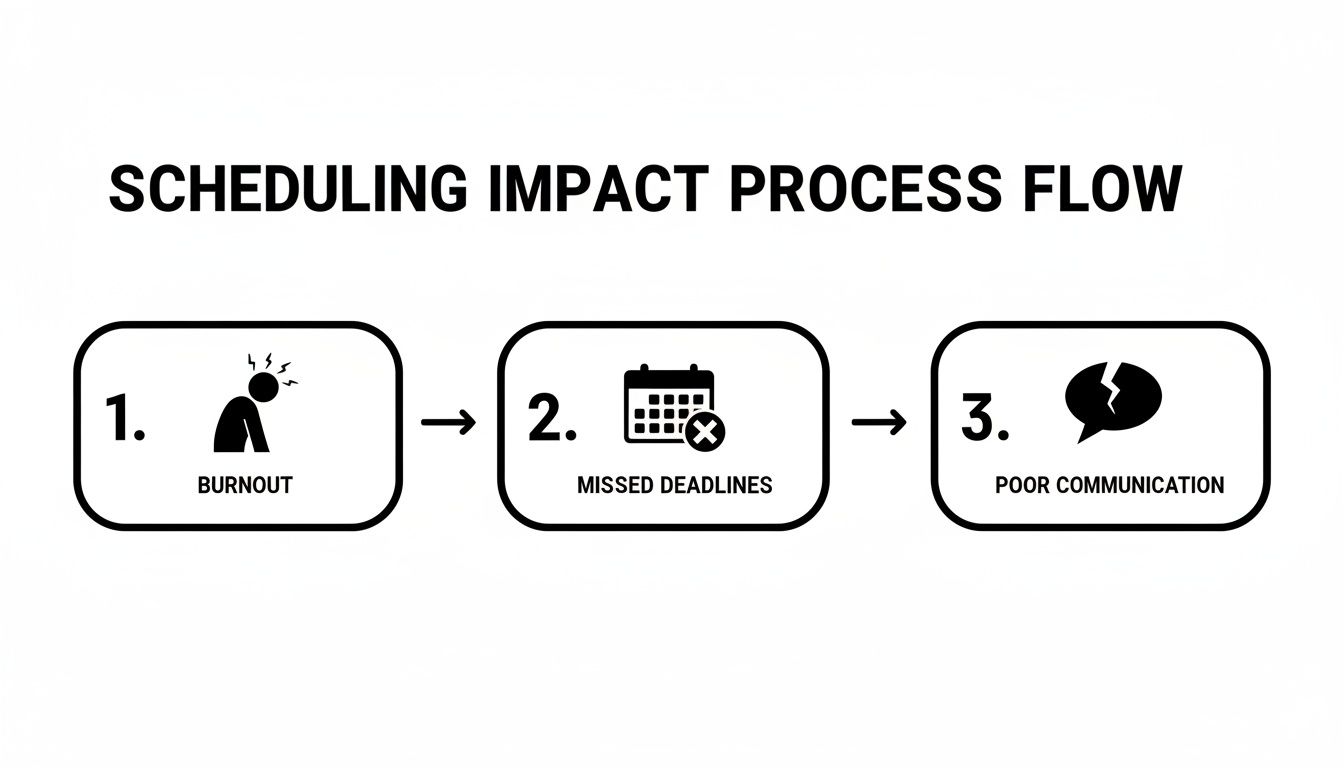
When you get scheduling wrong, the fallout can be massive—from team burnout to blown deadlines and terrible communication.
This simple flow shows how bad scheduling directly leads to project friction and unhappy teams. By using a visual planner and remembering the human side of the equation, you can create a scheduling rhythm that’s sustainable for everyone. If you want to dig deeper, you can learn more about finding the perfect time with a good timezone event planner.
Navigating UTC and Daylight Saving Time Changes
Just when you think you've got a handle on international scheduling, Daylight Saving Time (DST) shows up to throw a spanner in the works.
Those twice-a-year clock shifts are the silent killers of global meetings. They introduce a layer of confusion that can trip up even the most organised person. A perfectly good meeting time in February can easily become a pre-dawn disaster in April if you’re not careful.
The single best way I’ve found to fight this chaos is to adopt Coordinated Universal Time (UTC) as your team's unshakable standard. UTC is the one constant in a sea of shifting clocks; it never, ever changes for DST. By making it your single source of truth, you completely sidestep the mess created by local time changes.

It's a simple habit to get into. Just phrase invitations in UTC (e.g., "Our call is set for 14:00 UTC"). This removes any doubt about when people should show up. From there, everyone is responsible for converting that one, clear time to their local equivalent—a task modern calendars handle instantly.
The German DST Dilemma
Germany’s experience with DST really drives the point home. The country first started using DST way back in 1916, and today, over 83 million Germans adjust their clocks twice a year. For anyone doing international business, this is a huge disruptor.
In fact, surveys from German chambers of commerce found that a massive 68% of international business professionals in Berlin and Frankfurt have run into scheduling errors right around the DST transition weekends. On average, teams lose two to three hours a week just from mistakes caused by overlooked DST changes with their non-EU partners. You can track Germany's specific time change dates on timeanddate.com.
This isn't just a small hiccup. It's a real drain on productivity that a solid meeting time planner and clear UTC communication can easily prevent.
Actionable Tips to Avoid DST Disasters
Relying on UTC is the foundation, but a few proactive habits will make you pretty much immune to DST-related blunders. You have to be extra vigilant when scheduling meetings weeks or months out.
Here are a few practical strategies I use to keep my team's calendar synchronised:
- Always Verify Transition Dates: Never assume DST starts and ends on the same dates everywhere. The US, Europe, and Australia all switch on different weekends. A quick Google search can save you from a major scheduling headache.
- Use Full Time Zone Names: Instead of just writing "ET," be specific. Use "EDT" (Eastern Daylight Time) or "EST" (Eastern Standard Time). That extra letter clarifies whether DST is active for that location.
- Double-Check Recurring Meetings: This is a big one. A weekly call set for 9:00 CET will suddenly be at the "wrong" time for your US colleagues after one country—but not the other—springs forward. Make a point to reconfirm all recurring international meetings right after a DST change.
The most reliable meeting invitation isn't the one listing ten different local times. It's the one that lists one time—UTC—and empowers everyone to convert it for themselves.
Think about it. Imagine scheduling a critical client demo for early November. Your team is in Germany (CET), and the client is in New York (EDT). When you book it back in September, everything looks great. But on the first Sunday of November, the US "falls back" to EST, while Germany stays put for a bit longer. Just like that, your 15:00 CET meeting is an hour off for the client.
By anchoring everything to UTC, this entire category of problems just vanishes. It creates a clear, predictable rhythm for your global team, turning your meeting time planner for different time zones into a tool for clarity, not confusion.
Automating Your Scheduling with Smart Calendar Tools
Let's be honest: manually cross-referencing time zones and trying to find the perfect meeting slot is a soul-crushing waste of time. Thankfully, we've moved past that. Modern scheduling tools are built to handle all the heavy lifting, letting you focus on the meeting itself, not the logistical nightmare of setting it up.
You probably already have some powerful scheduling features right inside the calendar you use every day. Instead of guessing what time it is for your colleague in another country, you can often just see it.
Both Google Calendar and Outlook let you add multiple time zone clocks to your main view. It’s a simple tweak, but having that at-a-glance overlay of what time it is in Berlin, Tokyo, or New York makes a world of difference.
Going Pro with Dedicated Scheduling Apps
While the built-in features are great for a quick check, dedicated scheduling apps are where the real magic happens. If you’re regularly booking meetings with clients or partners overseas, tools like Calendly or Doodle are absolute game-changers.
Their superpower is automatic time zone detection. You set up your availability in your own time zone and share a simple booking link. When someone on the other side of the world clicks it, the app instantly translates your available slots into their local time.
No more mental maths for your client. They just see "Tuesday at 10:00 AM" and book it, without ever wondering if that’s your 10:00 AM or theirs. It’s a small detail that makes the whole experience feel seamless and professional.
The best scheduling tools don’t just find a time; they eliminate every possible point of confusion. By automatically translating times, they get everyone on the same page from the very first click.
These platforms also kill the endless back-and-forth email chains that used to be the price of admission for a simple 30-minute call.
To help you decide which tool might fit your needs, here’s a quick comparison of some of the most popular options available.
Comparison of Popular Meeting Scheduling Tools
A feature-by-feature comparison to help you choose the best meeting time planner tool for navigating time zones and automating your scheduling workflow.
| Tool Feature | Google Calendar | Calendly | Doodle Poll |
|---|---|---|---|
| Time Zone Detection | Manual (add clocks) | Automatic | Automatic |
| Best For | Internal team meetings | External client bookings | Group scheduling |
| Booking Link | No (Appointment Slots only) | Yes | Yes (Poll-based) |
| Group Polls | No | No | Yes |
| Integrations | Google Workspace | Extensive (CRM, video) | Basic (Calendars, video) |
| Ease of Use | Familiar interface | Very user-friendly | Simple, focused function |
Ultimately, the best choice depends on whether you're coordinating with internal teams, booking external clients, or trying to find a time that works for a large group.
The Rise of AI Scheduling Assistants
We're now entering the next era of scheduling: AI assistants. These emerging tools go beyond just showing available times—they can actually negotiate them for you.
Picture this: you need to find a 45-minute slot for three executives spread across London, Singapore, and San Francisco. Instead of you digging through calendars, an AI assistant can analyse everyone's availability, identify the few workable windows, and then email the group with proposals until a time is confirmed.
It’s a completely hands-off approach that turns a complex coordination headache into a single command. As this tech gets smarter and more integrated, finding the perfect meeting time will become almost invisible. To get a better sense of where this is all heading, you can explore the future of planning with artificial intelligence.
You’ve done the hard work and found the perfect meeting slot. Huge win. But that’s only half the battle.
Now comes the crucial part: communicating that time so clearly there’s zero chance of a mix-up. A rushed or vague invite can unravel all your careful planning, leading to no-shows, rescheduled calls, and a whole lot of frustration.
The secret is to make your invitations completely foolproof. Remove every bit of guesswork. This small upfront effort pays huge dividends, building trust and setting a professional, organised tone from the very start.

This kind of proactive communication is a game-changer, especially for German businesses working across Europe. Before the EU harmonised its Daylight Saving Time rules, scheduling was a nightmare. Now, things are much simpler for 446 million Europeans, with an estimated 30% drop in the kinds of scheduling conflicts that used to plague planners.
A poll by the BDA even found that 62% of German managers prefer the 9 AM-5 PM CET window. Why? It offers the best overlap with their European partners, proving just how much clear, standardised communication matters. You can learn more about how these time changes work in the DE region.
Crafting the Perfect Meeting Invitation
So, what does a confusion-proof invitation look like? It’s clear, concise, and gives everyone multiple ways to confirm the time. Your goal is to make it effortless for attendees to know when to show up, no matter where they are in the world.
Here are a few simple habits that make all the difference:
- List Multiple Key Time Zones: Don't just list your own time. Always include the local time for the main participants. It’s a small courtesy that shows you respect their time and have done the mental maths for them.
- Establish UTC as the Anchor: Somewhere in the invite, clearly state the meeting time in UTC (e.g., 13:00 UTC). This is the gold standard—a universal time that anyone, anywhere can easily convert from without ambiguity.
- Include a Converter Link: Pop a direct link to a time zone converter right in the body of the invite. This empowers people to double-check for themselves with a single click, giving them extra confidence.
An effective meeting invitation doesn't just state a time; it provides the tools and context needed for everyone to arrive on time, every time, without any second-guessing.
By weaving these simple steps into your process, you can build a reliable template for all your international meetings. Consistency is key.
An Example of a Clear Invitation Title
Stop using vague titles like "Project Sync." Instead, put the most important information right there in the subject line. This tiny change makes your invite instantly scannable and incredibly helpful.
Example Invite Title:
Project Phoenix Sync // 16:00 CET / 10:00 EST / 13:00 UTC
With a title like this, your key attendees know the time without even having to open the email. It’s a small detail that screams competence and thoughtful organisation.
Of course, getting people to show up at the right time is just the beginning. A well-timed meeting can still fall flat if it’s poorly run. Getting the timing right is just one of many essential virtual meeting best practices.
Think of clear communication as the thread that connects everything—from smart scheduling to a productive outcome. When you combine a powerful meeting time planner for time zones with impeccable communication habits, you create a seamless, professional experience for your entire global team.
Your Top Questions About Global Scheduling, Answered
Even when you've got the best tools and intentions, scheduling across time zones throws some serious curveballs. You're not alone in wondering about these things. Let's tackle the most common questions that pop up when you're trying to coordinate a global team.
What’s the Best Way to Handle Last-Minute Changes?
Last-minute changes are a pain for anyone, but they can completely derail someone's day (or night) in another time zone. A quick cancellation from your New York colleague at 4 PM on Tuesday might just have wiped out a 10 PM meeting for someone in Berlin, wrecking their evening plans.
The only way to handle this is with immediate, multi-channel communication. Don't just trust a single calendar notification to do the job.
- Ping them directly. Use whatever your team's go-to chat app is—Slack, Teams, etc.—and drop an "@" mention. It’s the fastest way to get their attention.
- Update the calendar invite right away. Officially cancel or move the event so their calendar reflects the change. This automatically adjusts to their local time and prevents confusion.
- Give a quick reason why. You don't need a novel, but a short "Hey, the client pushed our deadline, need to reschedule" shows respect for the person whose schedule you just blew up.
How Should I Set Up Recurring Meetings Across Time Zones?
Ah, the recurring meeting. This is where most of the pain lives, especially when Daylight Saving Time hits. That weekly 9 AM call that worked perfectly in February suddenly becomes a brutal 7 AM start for half the team in April.
The trick is to anchor the meeting to a single, stable time zone—usually the one with the most attendees or where the team lead is based. When you create the repeating event, don't just set it for "9:00 AM." Instead, set it for "9:00 AM Europe/Berlin," for example. This locks the meeting to Berlin's time, and everyone else's calendars will automatically adjust when their own clocks change.
A quick pro tip: Always send a quick message to reconfirm the time of any recurring meeting the week after a DST change. It's a simple check-in that prevents people from showing up an hour late and clears up any confusion from automated calendar updates.
Which Default Time Zone Should I Use on My Calendar?
This one is simple: your calendar's default time zone should always be your current, physical location.
It’s tempting to set it to your company's HQ time zone, but trust me, it’s a recipe for disaster. You'll end up doing mental gymnastics for every single local appointment and dramatically increase the odds of showing up an hour early or late for a coffee meeting down the street.
Modern calendar tools are built to handle the conversions for you, but they need an accurate baseline to work from. By keeping your default set to where you actually are, you let the software do the heavy lifting, making every other scheduling task way simpler and more accurate.
Ready to eliminate scheduling admin and get back 20 minutes every day? Calendar0 is an AI menubar calendar that unifies your calendars, prevents double-booking, and schedules meetings at the speed of thought. Start for free at https://www.calendar0.app.

